
Coding Exercise, Episode 1


I have received the following exercise from an interviewer, he didn't give the name of the problem. Honestly, I have no idea how to solve this problem even I have tried to read it three times before. Since I used to be a person who always tells myself "I am not the one good at algorithms", but giving up something too soon which I feel that I didn't spend enough effort to overcome is not my way. Then, I have sticked on it for 24 hours.

According to the given image on the problem, I tried to get more clues by searching. Thanks to Google, I found a similar problem on Hackerrank (attached link below). My target here was trying my best to just understand the problem and was trying to solve it accordingly by the Editorial on Hackerrank. Due to this circumstance, it turns me to love solving algorithms from now on (laugh). Check it out!

Problem

You are given a very organized square of size N (1-based index) and a list of S commands

The ith command will follow the format (a[i], b[i], d[i]) and will be executed as:

For every elements inside the inner-square whose top-left corner located at (a[i], b[i]) and bottom-right corner located at (a[i] + d[i], b[i] + d[i]) will rotate 90 degree clockwise. And the ith inner-square always contains (i + 1)th inner-square

E.g. If the input square with size N = 7 and command (2, 3, 3), the execution will be (image):
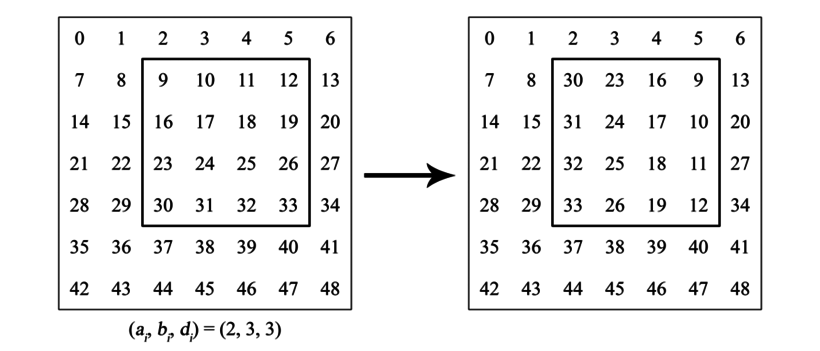
After executed S commands, you will then be asked to do L queries to determine the final location given the initial value w[i].
E.g. With the above example, the final position of 25 will be (4, 4) - its initial location was (4, 5)

Input format and constraints

- Line 1: integer N - size of the square (N <= 10^7)
- Line 2: integer S - number of commands (S <= 10^5)
- S subsequent lines: S commands with format (a[i], b[i], d[i]) with constraints
1 <= a[i], b[i] and 0 <= d[i] < N
a[i-1] <= a[i] and a[i] + d[i] <= a[i - 1] + d[i - 1]
b[i-1] <= b[i] and b[i] + b[i] <= b[i - 1] + b[i - 1]
The next line will contains integer L - number of queries (L <= 10^5)
Each subsequent line ask for the final position of a number w[i] (0 <= w[i] < N^2)

Here is one input example

7
2
1 2 4
2 3 3
2
11
24

Here is the output

4 4
2 5

Solution 

(with my commenting on the code)


Reference
[1]. https://www.hackerrank.com/challenges/king-richards-knights

Comments

  1. Holy shit, this is exactly the task that LenderRate has offered me back then xD.

    ReplyDelete

Post a Comment

Popular posts from this blog

JSF, Primefaces - Invoking Application Code Even When Validation Failed

A use case I have a form which has requirements as follow: - There are some mandatory fields. - Validation is triggered when changing value on each field. - A button "Next" is enable only when all fields are entered. It turns to disabled if any field is empty. My first approach I defined a variable "isDisableNext" at a backend bean "Controller" for dynamically disabling/enabling the "Next" button by performing event "onValueChange", but, it had a problem: <h:form id="personForm"> <p:outputLabel value="First Name" for="firstName"/> <p:inputText id="firstName" value="#{person.firstName}" required="true"> <p:ajax event="change" listener="#{controller.onValueChange}" update="nextButton"/> </p:inputText> <p:outputLabel value="Last Name" for="lastName"/> <p:i...

Attribute 'for' of label component with id xxxx is not defined

I got the warning in the log file when I have used the tag <h:outputLabel> without attribute " for " in xhtml file. It was really polluting my server log files. The logged information actually makes sense anyway! We could find an answer as the following: "Having h:outputLabel without a "for" attribute is meaningless. If you are not attaching the label, you should be using h:outputText instead of h:outputLabel." However, these solutions are not possible just for my situation. Instead of using h:outputText for only displaying text, my team has used h:outputLabel too many places. We were nearly in our release time (next day) so it is quite risky and takes much efforts if we try to correct it. Because the style (with CSS) is already done with h:ouputLabel . The alternative by adding attribute " for " the existing h:outputLabel is not reasonable either. I really need to find another solution. Fortunately, I came across a way if I cha...

Junit - Test fails on French or German string assertion

In my previous post about building a regex to check a text without special characters but allow German and French . I met a problem that the unit test works fine on my machine using Eclipse, but it was fail when running on Jenkins' build job. Here is my test: @Test public void shouldAllowFrenchAndGermanCharacters(){ String source = "ÄäÖöÜüß áÁàÀâÂéÉèÈêÊîÎçÇ"; assertFalse(SpecialCharactersUtils.isExistSpecialCharater(source)); } Production code: public static boolean isExistNotAllowedCharacters(String source){ Pattern regex = Pattern.compile("^[a-zA-Z_0-9_ÄäÖöÜüß áÁàÀâÂéÉèÈêÊîÎçÇ]*$"); Matcher matcher = regex.matcher(source); return !matcher.matches(); } The result likes the following: Failed tests: SpecialCharactersUtilsTest.shouldAllowFrenchAndGermanCharacters:32 null A guy from stackoverflow.com says: "This is probably due to the default encoding used for your Java source files. The ö in the string literal in the J...

4 Remarkable Notes for JSF Apps Using HTML5

In the previous post , I've already shared with you how my team consults clients by using a HTML prototype. This post is about the used technologies for reusing the provided HTML template and communicating with backend. What is the issue when using HTML elements with Primefaces components? Primefaces is a great extension for developing JSF web apps. However, it is really frustrating in case we have to make it work with an existing HTML template. Why? - Primefaces has its own theme for styling. - Primefaces changes the HTML structure. Therefore, that would be a huge effort to use the Primefaces' components to replicate the elements of the HTML template; especially it is impossible for images drawing by " canvas " tag. That requires us to find a better approach. Since Java EE 7 (introducing JSF 2.2 included), it supports to use HTML5 elements . The idea is that JSF components don't effect the style and HTML structure, so we can easily reuse the provided HTM...

BIRT - Fix the size of an image

I use a dynamic image as a logo my report in pdf. At the beginning, I use table to align the logo in left or right. I meet a problem with some images with a large width or height. My customer requires that the logo should be displayed in original size. These following steps solves my problem: 1. Use Grid instead of Table 2. Set Grid "Height" is 100%  and "Width" is blank 3. Set "Fit to container" for images are "true". Download the the template here .