
Coding Exercise, Episode 1


I have received the following exercise from an interviewer, he didn't give the name of the problem. Honestly, I have no idea how to solve this problem even I have tried to read it three times before. Since I used to be a person who always tells myself "I am not the one good at algorithms", but giving up something too soon which I feel that I didn't spend enough effort to overcome is not my way. Then, I have sticked on it for 24 hours.

According to the given image on the problem, I tried to get more clues by searching. Thanks to Google, I found a similar problem on Hackerrank (attached link below). My target here was trying my best to just understand the problem and was trying to solve it accordingly by the Editorial on Hackerrank. Due to this circumstance, it turns me to love solving algorithms from now on (laugh). Check it out!

Problem

You are given a very organized square of size N (1-based index) and a list of S commands

The ith command will follow the format (a[i], b[i], d[i]) and will be executed as:

For every elements inside the inner-square whose top-left corner located at (a[i], b[i]) and bottom-right corner located at (a[i] + d[i], b[i] + d[i]) will rotate 90 degree clockwise. And the ith inner-square always contains (i + 1)th inner-square

E.g. If the input square with size N = 7 and command (2, 3, 3), the execution will be (image):
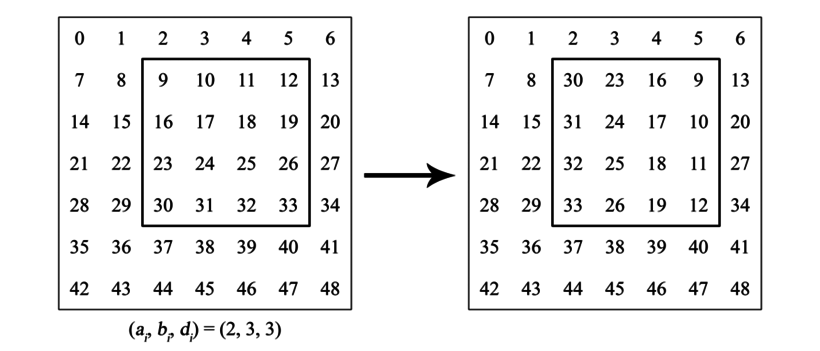
After executed S commands, you will then be asked to do L queries to determine the final location given the initial value w[i].
E.g. With the above example, the final position of 25 will be (4, 4) - its initial location was (4, 5)

Input format and constraints

- Line 1: integer N - size of the square (N <= 10^7)
- Line 2: integer S - number of commands (S <= 10^5)
- S subsequent lines: S commands with format (a[i], b[i], d[i]) with constraints
1 <= a[i], b[i] and 0 <= d[i] < N
a[i-1] <= a[i] and a[i] + d[i] <= a[i - 1] + d[i - 1]
b[i-1] <= b[i] and b[i] + b[i] <= b[i - 1] + b[i - 1]
The next line will contains integer L - number of queries (L <= 10^5)
Each subsequent line ask for the final position of a number w[i] (0 <= w[i] < N^2)

Here is one input example

7
2
1 2 4
2 3 3
2
11
24

Here is the output

4 4
2 5

Solution 

(with my commenting on the code)


Reference
[1]. https://www.hackerrank.com/challenges/king-richards-knights

Comments

  1. Holy shit, this is exactly the task that LenderRate has offered me back then xD.

    ReplyDelete

Post a Comment

Popular posts from this blog

BIRT - Fix the size of an image

I use a dynamic image as a logo my report in pdf. At the beginning, I use table to align the logo in left or right. I meet a problem with some images with a large width or height. My customer requires that the logo should be displayed in original size. These following steps solves my problem: 1. Use Grid instead of Table 2. Set Grid "Height" is 100%  and "Width" is blank 3. Set "Fit to container" for images are "true". Download the the template here .

Make simple music program with beep(freq, duration) with Pascal

Pascal is my first programing language when I have studied in high school. It was really exciting for me. :) The Pascal programming language was created by Niklaus Wirth in 1970. It was named after Blaise Pascal, a famous French Mathematician. It was made as a language to teach programming and to be reliable and efficient. Pascal has since become more than just an academic language and is now used commercially . I tried to make a simple music program by using Lazarus IDE on MS Window 7, 64-bit. It frustrated me a few times how difficulty to use Sound command to make a sound. Sound did not work on my compiler and my platform anymore. So far, I just could use beep(freq, duration) from window unit to implement my work. Here is my code. ;) program mysong; uses Windows, crt; const C: Integer = 512; { x = A * EXP(LN(2)/12)} C_: Integer = 542; D: Integer = 574; D_: Integer = 608; E: Integer = 644; F: Integer = 682; F_: Integer = 723; G: Integer = ...

Styling Sort Icons Using Font Awesome for Primefaces' Data Table

So far, Primefaces has used image sprites for displaying the sort icons. This leads to a problem if we want to make a different style for these icons; for example, I would make the icon "arrow up" more blurry at the first time the table loading because I want to highlight the icon "arrow down". I found a way that I can replace these icons with Font Awesome icons. We will use "CSS Pseudo-classes" to achieve it. The hardest thing here is that we should handle displaying icons in different cases. There is a case both "arrow up" and "arrow down" showing and other case is only one of these icons is shown. .ui-sortable-column-icon.ui-icon.ui-icon-carat-2-n-s { background-image: none; margin-left: 5px; font-size: 1.1666em; position: relative; } .ui-sortable-column-icon.ui-icon.ui-icon-carat-2-n-s:not(.ui-icon-triangle-1-s)::before { content: "\f106"; font-family: "FontAwesome"; position: ...

Tip for resolving the compile errors when importing a Maven project in Eclipse

Sometimes, I import a existing Maven project into Eclipse and I get some compile errors related to "pom.xml", "facet version of Web", and  so on. It was really frustrating me because I even cleaned, built and updated the project many times but the errors still occurred. I accidentally found the following steps to resolve this issue but honestly I still don't know why. Step 1 : Delete the project that met the compile errors in Eclipse, but don't delete it on disk. Step 2 : Open the project (by Windows Explorer if you use Windows) and remove  file/folder ".classpath", ".settings" and ".project" . Step 3 : Import the project back into Eclipse. ---^0^--- Maven is a build automation tool used primarily for Java projects. Eclipse is an integrated development environment (IDE).

Math fundamentals and Katex

It was really tough for me to understand many articles about data science due to the requirements of understanding mathematics (especially linear algebra). I’ve started to gain some basic knowledges about Math by reading a book first. The great tool Typora and stackedit with supporting Katex syntax simply helps me to display Math-related symbols. Let’s start! The fundamental ideas of mathematics: “doing math” with numbers and functions. Linear algebra: “doing math” with vectors and linear transformations. 1. Solving equations Solving equations means finding the value of the unknown in the equation. To find the solution, we must break the problem down into simpler steps. E.g: x 2 − 4 = 4 5 x 2 − 4 + 4 = 4 5 + 4 x 2 = 4 9 x = 4 9 ∣ x ∣ = 7 x = 7  or  x = − 7 \begin{aligned} x^2 - 4 &= 45\\ x^2 - 4 + 4 &= 45 + 4\\ x^2 &= 49\\ \sqrt{x}&=\sqrt{49}\\ |x| &= 7\\ x=7 &\text{ or } x=-7 \end{aligned} x 2 − 4 x 2 − 4 + 4 x 2 x ​ ∣ x ∣ x = 7 ​ = 4 5 = 4 ...